One Camera, Two Focal Lengths: Getting Serious About the X-T100's Crop Mode
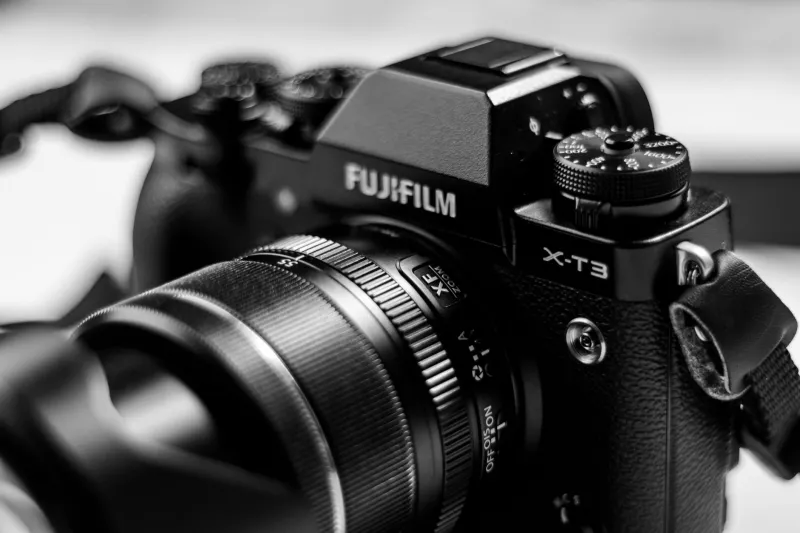
Here's a confession: the first time I stumbled into the X-T100's digital crop mode, I thought I'd accidentally changed a setting I wasn't supposed to touch. The image in my viewfinder suddenly looked tighter, the frame lines shifted, and I spent a solid three minutes wondering what I'd broken.
Turns out, I hadn't broken anything. I'd found something.
Crop mode — sometimes called digital teleconverter or simply the 1.4x and 2x crop function — tends to get dismissed as a compromise. The thinking goes: you're cropping into the sensor, so you're throwing away pixels, and anything that throws away pixels is a step backward. That logic isn't entirely wrong, but it misses a much more interesting conversation about how this feature can actually work for you rather than against you.
What Crop Mode Actually Does (And What It Doesn't)
Before we talk about why crop mode deserves more credit, let's be clear about the mechanics. The X-T100 shoots at 24.2 megapixels. When you engage the 1.4x crop, you're pulling from a smaller portion of that sensor, effectively multiplying your focal length by 1.4 — so your 35mm lens behaves more like a 50mm equivalent (keeping in mind the X-T100's APS-C crop factor is already 1.5x). Step it up to 2x, and that 35mm starts acting like a 70mm equivalent.
The trade-off is resolution. At 2x crop, you're working with considerably fewer pixels than the full sensor offers. If you're printing billboard-sized images or doing heavy post-processing crops, that matters. But for social media, web galleries, standard print sizes up to around 11x14, or video? You'd be hard-pressed to notice the difference in everyday shooting.
What you will notice is that your lens suddenly has a second personality.
The Practical Case: When Swapping Lenses Isn't an Option
Let's talk about real-world scenarios, because that's where crop mode earns its keep.
Imagine you're at a family gathering in your backyard — Fourth of July cookout, kids running around, the whole scene. You've got the 18-55mm kit lens on your X-T100. Everything's great for wide group shots, but then your niece starts doing something adorable thirty feet away and you need a tighter frame right now. You could dig through your bag for a longer lens, but by the time you've swapped, the moment is gone.
Crop mode is that moment's best friend. Two taps and you're shooting tighter. No lens change, no missed shot.
Or consider street photography in a busy urban environment — think downtown Chicago, the French Quarter in New Orleans, or the Pike Place Market in Seattle. Changing lenses on a crowded sidewalk is awkward at best and a recipe for disaster at worst. If you're shooting with a prime and you need a little more reach for a candid shot from across the street, crop mode gives you that flexibility without exposing your sensor to the elements or fumbling with your bag.
Photographer and X-T100 enthusiast Marcus Webb, who shoots primarily in Portland, Oregon, put it this way: "I used to think crop mode was a crutch. Now I think of it as a second prime lens that weighs nothing and costs zero dollars. When I'm walking around with just the 27mm pancake, the 2x crop basically gives me a 55mm equivalent. That's two focal lengths in one tiny package."
Autofocus and the Crop Mode Advantage
Here's something that doesn't come up enough in discussions about crop mode: it can actually improve autofocus behavior in certain situations.
When you're shooting in crop mode, the X-T100 is working with a smaller area of the frame. In some scenarios — particularly when you're using face detection or tracking a subject against a busy background — the reduced field of view means there's simply less competing information for the AF system to process. The camera can lock onto your subject more decisively because there are fewer distractions in the frame.
This isn't a universal improvement, and it won't turn the X-T100's contrast-detect autofocus into something it isn't. But photographers who shoot portraits at events, or anyone trying to isolate a subject in a cluttered environment, have reported that crop mode makes the AF feel snappier and more reliable in those specific contexts.
It makes sense when you think about it. You're essentially pre-cropping the scene, giving the camera a more focused (pun intended) area to work with.
Bridging the Gap Between Primes
One of the most underrated uses of crop mode is as a focal length bridge when you're building out a prime lens kit on a budget.
A lot of X-T100 users are working with one or two lenses — maybe the 35mm f/2 and the 18mm f/2 (Fujifilm's XF lineup translates to roughly 52mm and 27mm equivalent respectively on this body). There's a gap between those focal lengths that traditionally requires another lens. Crop mode doesn't perfectly fill that gap, but it gets you closer than you might expect.
Apply a 1.4x crop to your 18mm and you're suddenly in 38mm-equivalent territory. That's a genuinely useful mid-range perspective that works well for environmental portraits, casual street scenes, and travel documentation. It's not a replacement for a dedicated lens in that range, but it's a legitimate option when you're traveling light or haven't yet invested in a third prime.
Ashley Tran, a travel photographer based in Austin who frequently shoots national parks and road trip destinations across the Southwest, uses this approach deliberately: "I travel with the 18mm and the 35mm. The crop mode on the 35mm gives me something close to an 80mm portrait equivalent. For landscapes, I almost never need it. But when I'm photographing people I meet on the road, that tighter framing is gold, and I don't have to carry a longer lens just for those moments."
How to Set It Up for Fast Access
If crop mode is going to be part of your workflow, you don't want to be digging through menus to find it. The X-T100 lets you assign functions to custom buttons, and this is a perfect candidate for the Fn button or a quick-access spot in your My Menu setup.
Once it's assigned, toggling between crop modes becomes a one-button operation. You can cycle through off, 1.4x, and 2x without ever pulling the camera from your eye. That speed is what makes the feature actually usable in fast-moving situations.
Also worth noting: if you shoot RAW, crop mode information is embedded in the file but the full sensor data is still captured. That means you can choose to honor the crop in post or ignore it entirely and work with the full frame. It's the best of both worlds if you want the in-camera framing cue without permanently committing to the crop.
Stop Treating It Like a Compromise
The photography community has a habit of treating any form of digital cropping as a concession — something you do when the "real" solution isn't available. That framing (no pun intended this time) doesn't hold up when you look at how working photographers are actually using the X-T100's crop mode.
It's fast. It's free. It gives you a second effective focal length from every lens in your bag. And in the right situations, it can make your autofocus work harder for you.
The pixels you give up are real, and they matter in specific contexts. But for the majority of X-T100 shooters — people who are posting to Instagram, filling family photo albums, or building travel galleries — the output quality is more than sufficient.
Next time you're out shooting with a single prime and wishing you had something longer, don't automatically reach for the bag. Try the crop mode first. You might be surprised how often it's exactly the lens you were already carrying.